.JPG)
Tuesday, 5 May 2015
Screening

Initial ideas

Introducing our group
This is our group, in our group there are 4 members, Barbara, Ausrine, Ross and myself

Barbara is bottom left, Ausrine is top left, Ross is bottom right and I am top Right.
Ident Designing/Making
However, a still picture wasn't very good and typical ident's have explosions so we had to change our idea. We then thought of using a quick gif of a supernova.
This was the gif we used as it didn't lag like the other gifs and it was simple. We had to give it a name (production company) so we thought of the 'NOVA PRODUCTIONS'. We also put low music over it as the music goes over the ident and the start of the film. This can be seen in the first draft.
To put the name of the production in Ross and Michael had to use Photoshop and add the text in.
 With these steps they could set the colour, font and size of the text.
Title sequence : Designing/Making
Designing/Making:Title Sequence
I was in charge of creating the title sequences. During this process, I learnt where to get the screen for the names and how to use them. As per usual, the title sequence had to follow the general order of names.
After the IDENT use a FADE IN. The titles should then be in the following order:
I was in charge of creating the title sequences. During this process, I learnt where to get the screen for the names and how to use them. As per usual, the title sequence had to follow the general order of names.
After the IDENT use a FADE IN. The titles should then be in the following order:
(1) 'Your Production Company' Presents (NOVA PRODUCTIONS)
(2) A Film by 'One name - usually the director' (Ausrine Blazeviciute)
(3) Starring or With (Barbara)
(4) Male star (Ross)
(5) Female star or other way round (male-Michael)
(6) Title of film - or could be at the end (At end)
(7) Also starring - 2/3/names - each on separate title (-)
(8) Then 3/4/5 of the following - you choose - each on seperate title
-Editing (Michael)
-Music (Barbara)
-Cinematography or Director of Photography (Ausrine)
-Casting
-Set Designer
-Costume Designer
-Script (Ross)
(9) Then Producer(s) - can be more than one (Ross)
(10) Always finish with Director - one name, usually the same as A Film By ...(Ausrine)
(11) Could put title here (GONE)
(12) Finish with a fade out & fade music out
(2) A Film by 'One name - usually the director' (Ausrine Blazeviciute)
(3) Starring or With (Barbara)
(4) Male star (Ross)
(5) Female star or other way round (male-Michael)
(6) Title of film - or could be at the end (At end)
(7) Also starring - 2/3/names - each on separate title (-)
(8) Then 3/4/5 of the following - you choose - each on seperate title
-Editing (Michael)
-Music (Barbara)
-Cinematography or Director of Photography (Ausrine)
-Casting
-Set Designer
-Costume Designer
-Script (Ross)
(9) Then Producer(s) - can be more than one (Ross)
(10) Always finish with Director - one name, usually the same as A Film By ...(Ausrine)
(11) Could put title here (GONE)
(12) Finish with a fade out & fade music out
Shooting schedule
Shooting Schedule *FINISHED*
Day
|
Scene
|
Location
|
Equipment
|
Costumes
|
Props
|
Cast +Crew
|
1
2 3 |
First Flashback
Chase Scene Confrontation |
Dagenham Central Park
Eastbrook School (Alley) Eastbrook School (abandoned room) |
-Camera
-Tripod
-Microphone
-Camera -Tripod -Camera -Tripod -Flashlight -Phone |
-Leather Jacker
-Skirt -Hood Jeans -Leather Jacket (2x boy/girl) -Jeans -Hood -Leather Jacket -Hood -Jeans -Heels |
-----
----- ----- |
-Barbara
-Michael -Ross -Ausrine -Michael -Ross -Barbara -Ausrine -Ross -Barbara -Michael -Ausrine |
 This is where the first flashback will be filmed.
To fit in with the abandoned look we also had to film in an abandoned room. There was an abandoned looking room at the back of the drama studio which we used.
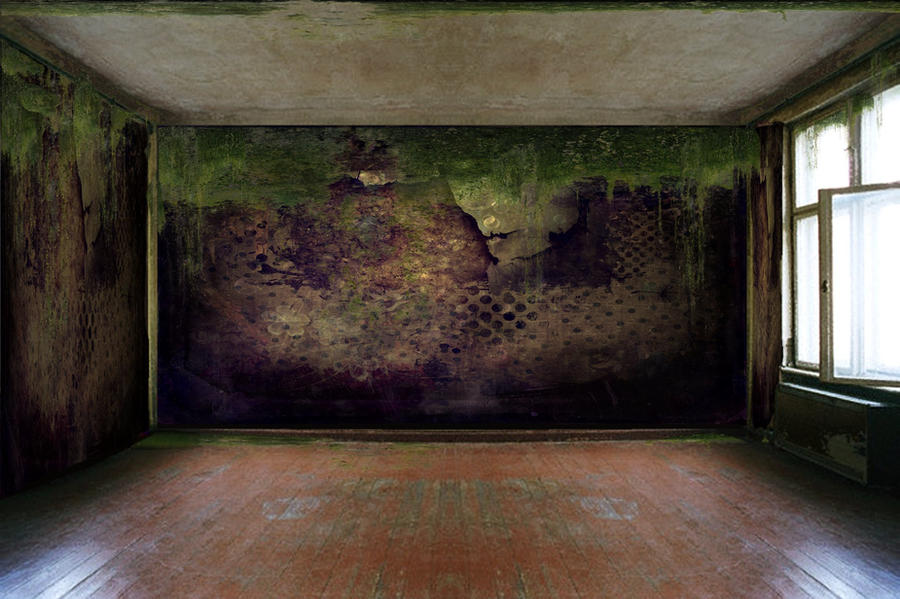 This wasn't the exact room. However, this kind of looked like it but it was darker. Also, we could've added more light and took some away as there were numerous switches that you could press.
Treatment
Treatment
|
Group Roles
Cinematography:
Long shot, wide shot, medium shot, close up, extreme close up, point of view, low angle, high angle,tilt, crane shot, tracking shot, over the shoulder shot. (Ausrine)
Mise-en-scene:
Costumes; leather jacket 2x, jeans, hooded jumper, heels. Props; metal bar. Location; Central Park, Eastbrook School (alley), Eastbrook School (abandoned room). Make-up; Barbara (dangerous) dark lipstick, long dark hair, heavily made up eyes. (Barbara, Michael, Ross)
Sound:
Background; birds chirping, forest noises, dramatic music, ident, buzzing noise (room), bang (distraction, all heads turn) (Ross, Michael)
Editing:
fade in/out, white and black, jump cut. Flashbacks. Match on action. Straight cut. Eye line match. Continuity editing. 180 degree rule. ( Ausrine, Michael, Barbara, Ross)
|
Title:
Gone
Tag Line:
What would you do?
|
Synopsis:
A couple are ruthlessly split apart and it's up to her to figure out what happened and why it happened. The audience are shown flashbacks to fill in the gaps whilst she uncovers the mystery and is forced to confront him. The twist of events will leave the audience and her on the edge of heir seats.
|
Key Genre Conventions:
Fast paced music
Dark clothing; jeans, leather jacket
Mysterious murder (brutal)
Confession
Prop; metal bar, rope, chair
Alley, abandoned room
Action (chase)
Flashbacks to make the tension rise up and then fall again.
|
Titles
Production company: New Line Cinema, Arnold Kopelson
Film by: David Fincher
Stars: Brad Pitt, Morgan Freeman, Gwyneth Paltrow etc.
Film by: David Fincher
Stars: Brad Pitt, Morgan Freeman, Gwyneth Paltrow etc.
Title sequences like this follow a pattern in the way that the stars of the film comes first and the director comes last, as well as the cast and director there is the title of the film as seen above. This is a good example of a opening title sequence because it follows the pattern as well as this, the title sequence has been constructed well as it very interesting in the way that the titles are spread out on the screen, and there is a good combination of dark colours.
Tuesday, 28 April 2015
Question 7
Looking back at your preliminary task what do you feel you have learned in the progression from it to the product?
Looking back at the preliminary task, and comparing it to the final product i can see that there has been a lot of things that we have learnt along the way, for example looking back at the preliminary task we can see a lot of moments where the camera was shacking, this was down to the tripod being hit or kicked. As well as this there was the problem of shaky tracking shots. From this we learnt how to be more careful around the tripod as well as how to get a smooth tracking shot. The best way to get a smooth tracking shot is down to starting to record the tracking shot and turning the tripod round more, this is to avoid the jolt that you get when you first start moving the tripod, also it is helpful to carry on recording the tracking shot so that when you want to cut into another scene you don't get a jolted stop.
Another thing that we have learnt is how to edited better, comparing our preliminary to our final product we can see that the editing on the preliminary is basic sort of editing, with just straight cuts, however if we look at the final product we can see a whole rang of different types of edits, for example we used fades, dissolves as well as straight cuts. By doing this it makes the consumption of the product more smoother, as well as being my interesting to watch. Further more with the preliminary task we didn't know what we was really doing, where as on the final product we had a full idea of what we was going to do and how we was going to do it.
Question 6
What have you learnt about technologies from the process of constructing this product?
From the process of constructing this product I have learnt of new programs on computers such as premiere pro, this program we used for every piece of footage we filmed, the first time we used this software was at the beginning of the year where we filmed Ross walking around the school and we used different camera angles. From there we started to use this program in nearly every lesson, this was to get us familiarly with the software of the program. By the time we got to the editing of the final film, all of us in the group were able to use premiere pro.
As well as premiere pro there was the sites that we used on the internet, for example blogger, before I started this course I hadn't used blogger, and I was new the site but now I have used it to do the course work for the media AS course. From this site i have learnt how to embed power points as well as other stuff into the blogs as well as other stuff like how to make my own blog page.
The hardware that we used through out the year was mainly the camera and the computers, again before the course started i didn't know how to use either the camera or the mac books that we used. However now I can now use them efficiently.
From the process of constructing this product I have learnt of new programs on computers such as premiere pro, this program we used for every piece of footage we filmed, the first time we used this software was at the beginning of the year where we filmed Ross walking around the school and we used different camera angles. From there we started to use this program in nearly every lesson, this was to get us familiarly with the software of the program. By the time we got to the editing of the final film, all of us in the group were able to use premiere pro.
As well as premiere pro there was the sites that we used on the internet, for example blogger, before I started this course I hadn't used blogger, and I was new the site but now I have used it to do the course work for the media AS course. From this site i have learnt how to embed power points as well as other stuff into the blogs as well as other stuff like how to make my own blog page.
The hardware that we used through out the year was mainly the camera and the computers, again before the course started i didn't know how to use either the camera or the mac books that we used. However now I can now use them efficiently.
Thursday, 23 April 2015

Monday, 9 March 2015
Styles of editing
Straight cut
- Most common and 'invisible' form of transition, this means that it is hardly noticeable, and that when editing it would be okay to use them over and over again.
- One shot moves instantaneously to the next without attracting the audiences attention. This helps retain reality.
Dissolves
-This is fading one shot of the screen while fading another shot onto the screen at the same time.
-The audience will be able to see both shots on screen at the same same at the midpoint.
Fade
-Gradual darkening or lightening of an image of scene, this can indicate the passing of time or going back in time, for example a flashback.
Wipes
-One scene is pushed of the screen with another scene, a good example of this is in star wars, in this film George Lucas uses a great deal of this.
Jump cuts
- This is where the audiences attention is focused on something very sudden, it appears that a part of the scene has been removed.
Graphic match
- The filmmaker can choose to place shot in a certain order so as to create a smooth visual transition.
Thursday, 5 March 2015
"GONE" thriller opening, final draft
This is the final product of the opening film thriller that we have filmed for our coursework.
Monday, 2 March 2015
Genre
Genre is a term that means types of film. For example in the film industry there are many types of film. The one that we are looking are thrillers. An example of a thriller would be north by north west.


In most films genre is mixed for example you can have a rom-com which is a mixture of romantic film and a comedy film.
Tuesday, 27 January 2015
2nd Editing Session
During the second editing session Ross and myself finished the ident for our thriller opening, while Barbara and Ausrine added the scenes that we recorded on thursday to the opening of the thriller.
Thursday, 22 January 2015
2nd Filming Session
During the 2nd filming session we came across a problem which in-tailed our group needing a teacher to be in the room while we film. However we sorted this out by filing a different scene, filming this session was a success as we got the whole scene done.
Thursday, 15 January 2015
1st Editing Session
This editing session has taken place during our media lesson monday first period.
1st Filming Session
In our first filming session that took place on the 15th of january on a Thursday, we went to or local park and started filming one of the scenes in the opening of our thriller. In this scene the characters being filmed were Barbara and myself character's. This session did not turn out to well as someone had forgotten there costume and we hadn't exchanged numbers so we couldn't tell what time we were meeting for the 1st filming session, from this we have learnt from our mistakes.
Monday, 12 January 2015
Risk Assessment
Risk Assessment
Group Members: Ausrine, Barbara, Ross, Michael Location: Eastbrook Comprehensive School
Hazard
|
Person(s) at Risk
|
Likelihood of Hazard
1 – Extremely Unlikely
5 – Extremely Likely
|
Severity of Hazard Outcomes
1 – Very Low Risk
5 – Very High Risk
|
Risk Level
(Likelihood + Severity)
2
|
Measures to Take to Manage Risk
|
Risk Managed?
Y/N
|
Tripping up on cables
|
Everyone
|
2
|
put carpet over the wires to make sure we don't trip over.
|
yes
| ||
(slap) cut between the slap so it looks real
|
Ross
|
2
|
4
|
we made sure that barbara didn't swing here hand to hard at ross
|
yes
| |
Michael hitting his head when he falls.
|
Michael
|
3
|
4
|
made sure that when I fell properly with my hands out
|
yes
| |
Ross
Michael
|
1
|
2
|
when tying the knot we made sure that they wasn't to tight
|
yes
|
Animatic
This is the animatic to our media product, this is going to be a rough idea of what our final product is going to look like.
The shots will be:
- Medium Shot- Barbara shouting at Ross as he is on the chair. Slap or hit. Michael and Barbara at the park. Ross chasing Michael.
- Long Shot- Barbara walking up to Ross. Michael and Barbara at the park.
- Wide Shot- Barbara and Michael in the park. Barbara and Ross in the abandoned room. Michael and Ross chase.
- Extreme close up- lamp. Ross' face. Barbara's face. Michael's face. Ross' feet.
- Close up- Michael and Barbara
- Point of view- Everyone turns their heads to the door.
- Low angle-Ross over Michael
- High angle- Barbara walking towards Michael (on floor)
- Tilt- To the light bulb
- Crane shot- Barbara walking down the stairs
- Rolling shot
- Over the shoulder- Barbara and Michael
The sound will include:
- Background city noises
- Muffled shouting
- Forest noises
- Band (sound effect)
- Thud (sound effect)
The editing styles will be:
- A straight cut (between chase scenes)
- Dissolves (flashbacks)
- Fades (Michael laying after Ross walks away)
- Jump cut (Barbara walking up to Michael)
- Eye line match- Barbara looking at Ross/ Michael
- Match on action-Ross and Michael running through the gate
- 180 degree rule- MUST NOT BREAK
- Shot reverse shot- confrontation, conversation. Ross-Barbara. Barbara- Michael
The mise en scene will include:
- Props-Metal rod. Phone.
- Body language-hands behind back (Ross). laying down (Michael)
- Lighting-Flash light (phone) Room lamp
- Costume, hair, make-up- 2x leather jacket, hood, jeans, heels, long dark hair, dark lipstick, pale face
- Position of camera- behind fence, on the stairs
- Setting- park (love flashback. Alley (chase scene). Abandoned room (confrontation)
Location sheet
Location Visit Sheet
Writer: Barbara Nuhiallari
Producer: Ausrine Blazeviciute
Director: Ross McDermott
Date: 12/1/15
|
Rough Sketch/Explanation of location and key points to note
Location 1: Small room – this room is used by Barbara’s character to interrogate Ross’s character
|
Health and Safety Issues to note:
|
Potential Filming Problems :
|
Costume and props sheet
Costumes and Props Sheet
Character Name: Jacob Smith
| |
Costume: Light blue jeans/ black t-shirt/ black leather jacket zipped up/ grey, dirty blazers (trainers)/ scruffy hair/ make-up for bruises/ fake blood for cuts
|
Props: Chair/ long, thick rope/ short, thin rope
|
Character Name: John Mishel
| |
Costume: Blacky grey jeans/ white t-shirt/black converses/ plainly fixed hair (no gel)/ make-up for past bruises in healing stage
|
Props: None
|
Character Name: Venera Marchetti
| |
Costume: black trousers/ tight, black t-shirt/ black boots/ black gloves/ black leather jacket/ dark make-up (dark eye-shadow, dark red lip-liner, black eye-liner, thick mascara)/ hair down straightened + volumed
|
Props: Holster/ sharp knife/ gun/bullets
|
Shot list
|
Shot List
|
||
|
Scene
|
Shot Number
|
Description
|
|
1
2
3
4
5
|
1
2
3
4
1
2
1
1
1
2
|
muffled sound, looking at light bulb. Tilt down into next
shot.
medium shot of ross tied to a chair.
over the shoulder shot looking at barbara
wide shot of both barbara and ross in the room.
cut to ross hitting michael - POV
high angle of michael on the floor
cuts back to barbara with ross in the room - over the
shoulder on ross looking at barbara
cuts to barbara and michael in a park shot reverse shot and
wide angle.
cut back to ross and barbara in the room
michael walks in to room - low angle
|
Subscribe to:
Posts (Atom)